Varun Narayanan
November 27, 2025
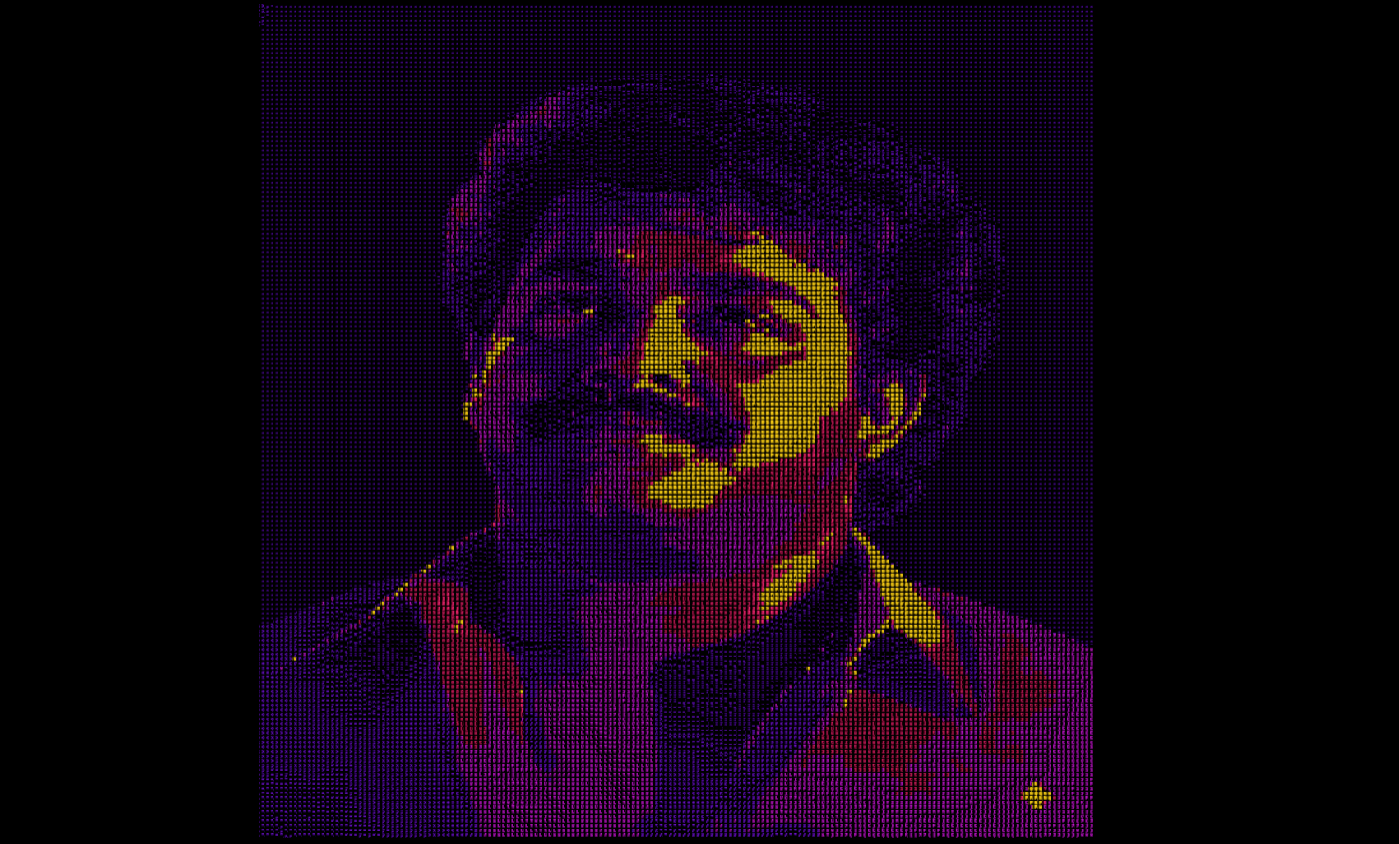
Ascii art using webgpu and 3js
How I created this ascii art using 3js and webgpu
How to get started
To get started which is the hard part we need a initial setup template which I already have, which only sets up the palette for us to work on, kindly clone this link. I have learned this from yuri artiukh's youtube video on ascii art so do check him out, if you have the starter template you are ready to go
The Core ConceptThe effect works by:
-
Analyzing the brightness of each pixel in a source image
-
Mapping that brightness to an ASCII character
-
Applying a synthwave-inspired color palette based on brightness levels
-
Rendering everything using GPU-instanced geometry for performance
-
Let's dive into how each piece works.
Part 1: Setting Up the ASCII Character Texture
1
createAsciiTexture() {2
let dict = `.-':_,^=;><+!rc*/z?sLTv)J7(|Fi{C}fI31tlu[neoZ5Yxjya]2ESwqkP6h9d4VpOGbUAKXHm8RD#$Bg0MNWQ%&@`;3
let canvas = document.createElement("canvas");4
let ctx = canvas.getContext("2d");5
this.length = dict.length;6
canvas.width = this.length * 64;7
canvas.height = 64;8
}
The ASCII Dictionary: The characters are ordered from darkest (.) to brightest (@). Each character represents a different brightness level. Canvas Texture Creation: We create a horizontal strip texture where each character occupies a 64x64 pixel cell. This allows the shader to sample different characters by adjusting the UV coordinates.
Blur Effect for Dense Characters: Notice the special handling for characters after index 50:
1
if (i > 50) {2
for (let j = 0; j < 6; j++) {3
ctx.filter = `blur(${j}px)`;4
ctx.fillText(dict[i], 32 + i * 64, 40);5
}6
}
This creates a glow effect for the densest characters, adding visual depth.
Part 2: Creating the Instanced Mesh Grid
1
let rows = 180;2
let columns = 180;3
let instances = rows * columns; // 32,400 instances4
let size = 0.1;
Instead of creating 32,400 individual plane geometries, we use InstancedMesh for massive performance gains. Each instance represents one "pixel" in our ASCII grid.
Position Calculation:
1
this.positions[index * 3] = i * size - (size * (rows - 1)) / 2;2
this.positions[index * 3 + 1] = j * size - (size * (columns - 1)) / 2;3
this.positions[index * 3 + 2] = 0;
This centers the grid around the origin, creating a plane from -9 to +9 in both X and Y directions.
Custom Attributes: We add two crucial custom attributes:
- aPixelUV: Maps each instance to a coordinate in the source image
- aRandom: Adds subtle randomness to prevent banding artifacts
1
this.geometry.setAttribute(2
GeometryAttribute.aPixelUV,3
new THREE.InstancedBufferAttribute(uv, 2)4
);
Part 3: The Shader Magic
Now for the most interesting part - the material shader that brings everything together. Color Palette Setup
1
const palette = ["#8c1dff", "#f223ff", "#ff2976", "#ff901f", "#ffd318"];2
const uColor1 = uniform(color(palette[0])); // color changes hex color code to three.js compatible color code3
const uColor2 = uniform(color(palette[1]));4
const uColor3 = uniform(color(palette[2]));5
const uColor4 = uniform(color(palette[3]));6
const uColor5 = uniform(color(palette[4]));
We define a synthwave gradient from purple through pink, red, orange, to yellow. These colors will be applied based on brightness.
Brightness Calculation
1
const textureColor = texture( uTexture, attribute(GeometryAttribute.aPixelUV) );2
const brightness = pow(textureColor.r, 1.4).add( attribute(GeometryAttribute.aRandom).mul(0.01) );
Key points:
We sample the source image using our custom aPixelUV attribute pow(textureColor.r, 1.4) applies a gamma correction to enhance contrast Adding a tiny random value breaks up color banding
ASCII Character Selection
1
const asciiUV = vec2(2
uv().x.div(length).add(floor(brightness.mul(length)).div(length)),3
uv().y4
);
This is the clever part! We manipulate the UV coordinates to select the right character:
1
floor(brightness.mul(length)) //converts brightness (0-1) to a character index (0-92)2
.div(length) //normalizes it back to UV space3
uv().x.div(length) //scales down the X coordinate to fit within one character cell
Adding them together gives us the correct horizontal position in our texture strip
Color Mixing Based on Brightness
1
let finalColor = uColor1;2
finalColor = mix(finalColor, uColor2, step(0.2, brightness));3
finalColor = mix(finalColor, uColor3, step(0.4, brightness));4
finalColor = mix(finalColor, uColor4, step(0.6, brightness));5
finalColor = mix(finalColor, uColor5, step(0.8, brightness));
The step() function creates hard transitions:
Below 0.2 brightness: Color 1 (purple) 0.2-0.4: Color 2 (pink) 0.4-0.6: Color 3 (red) 0.6-0.8: Color 4 (orange) Above 0.8: Color 5 (yellow)
Final Composition
1
return asciiColor.mul(finalColor);
We multiply the ASCII texture color by our gradient color, creating the final colored ASCII art.
Part 4: Rendering Loop
1
render() {2
if (!this.isPlaying) return;3
this.time += 0.05;4
requestAnimationFrame(this.render.bind(this));5
this.renderer.renderAsync(this.scene, this.camera);6
}
Using renderAsync() is crucial for WebGPU - it allows the GPU to work asynchronously for better performance. Performance Considerations
Why This Approach is Fast:
GPU Instancing: One draw call renders 32,400 squares
Texture-based ASCII: No text rendering per frame
Shader-based computation: All brightness calculations happen in parallel on the GPU
WebGPU: Modern API with lower overhead than WebGL
Conclusion
This ASCII art effect combines clever texture manipulation, GPU instancing, and procedural color grading to create a stunning visual effect that runs smoothly even with tens of thousands of instances. The key insights are:
1.Using a horizontal texture strip for efficient character lookup
2.Leveraging brightness-to-UV mapping for character selection
3.Applying instanced rendering for performance
4.Creating smooth color transitions with step functions
Live demo is right here